Possible queries:
How do I save a report?
Can I make changes to curated report and save it?
I want to add custom filters to report and save it, how can it be done?
Resolution Path:
- Validate account and plan details.
- To modify and save changes made to Curated reports, the existing reports can be cloned. Cloning reports and cloning widgets are available from certain plans as shown below:
Feature Old Plan Current Plan Saving reports Blossom+ Growth+ Saving widgets Estate+ Pro+ - Once you go inside a curated report, switch from Viewing mode to Editing mode. Now, click on the report name (say Ticket Volume Trends) to get the Clone Report option.
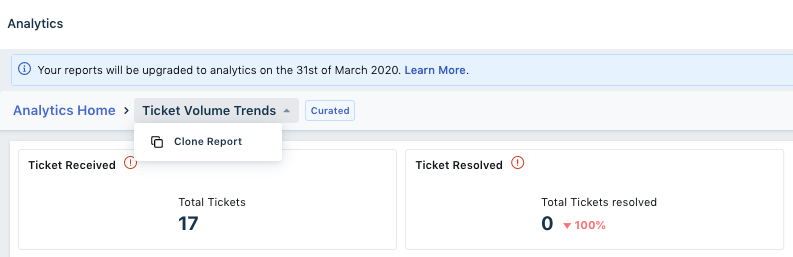
- If the customer requires help with cloning and saving a report OR cloning and saving a widget, refer to the below article which has steps mentioned in detail
https://support.freshdesk.com/en/support/solutions/articles/240707-saving-reports-in-analytics - Attached is a PDF with some sample use cases and steps for reference:
Was this article helpful?
That’s Great!
Thank you for your feedback
Sorry! We couldn't be helpful
Thank you for your feedback
Feedback sent
We appreciate your effort and will try to fix the article