Possible queries:
How to convert an agent into a collaborator?
Resolution path:
We cannot directly convert an agent into a collaborator. To convert an agent into a collaborator, we would need to first convert them into a contact and then convert the contact to a collaborator.
Steps to convert the agent to a contact
1. Navigate to Admin > Teams > Agents > Agents tab
2. Click on the agent profile which you want to convert to a contact
3. Click Convert to a contact

4. If you face any issues when converting the agent to a contact, you can make use of the below query to identify the reason for failure from logs.
Access sumologic tool using this link and use the below query to identify the request ID.
Query - "account_ID" AND "agents" AND "convert_to_contact"

From the resultant search look for value id and query the "id" value in haystack for the concerned time to identify the reason for failure.
Steps to convert the contact to a Collaborator
1. Navigate to Customers > Contacts
2. Select the contact you want to convert to a Collaborator
3. Click Convert to agent > Collaborator > Convert
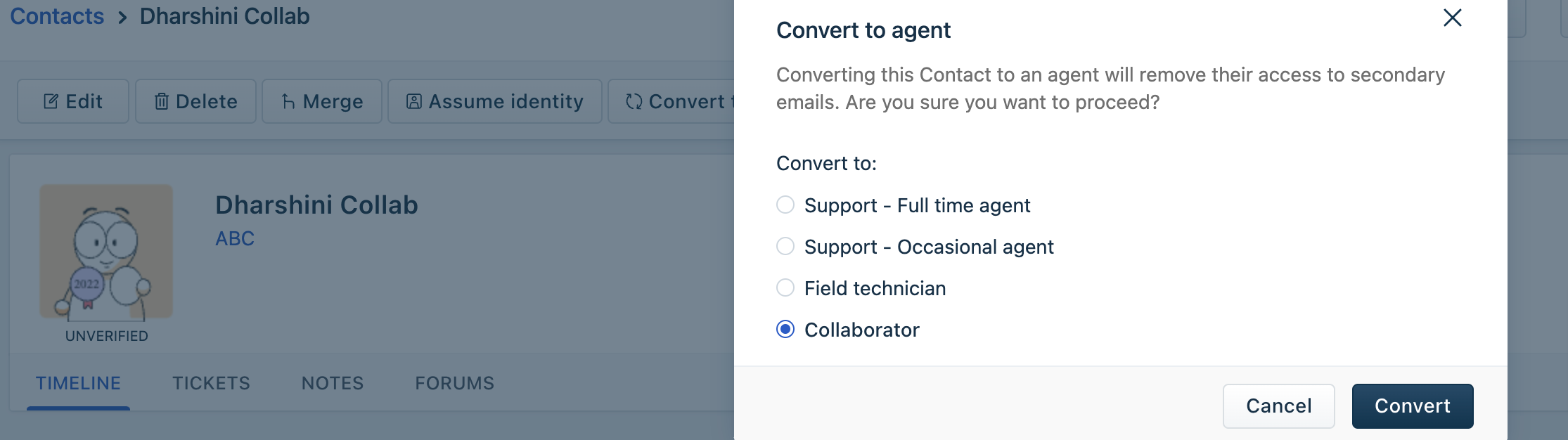
4. If you face any issues when converting a contact into a collaborator, you can make use of the below query to identify the reason for failure from logs.
Access sumologic tool using this link and use the below query to identify the request ID.
Query - "account_ID" AND "contacts" AND "make_agent"

From the resultant search look for value id and query the "id" value in haystack for the concerned time to identify the reason for failure.
Was this article helpful?
That’s Great!
Thank you for your feedback
Sorry! We couldn't be helpful
Thank you for your feedback
Feedback sent
We appreciate your effort and will try to fix the article