In Freshdesk, you can control both aspects of an agent's activities - what they can see, and what they can do. You can create special privileges and profiles for agents to control what they do with Agent Roles (you can even create custom roles, if you're on the Estate/Forest plan) and you can control what agents can see with Ticket Scope.
You can choose between three different levels of Scope:
- Global - can view tickets all across the helpdesk
- Groups - can view tickets assigned to their group and tickets assigned to them
- Restricted - can only view tickets assigned to them
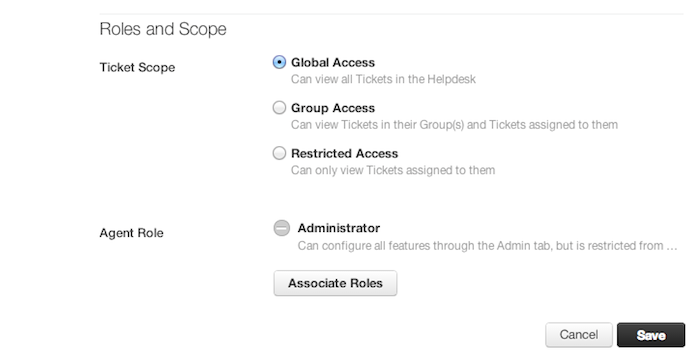
Quick guide to changing an agent's ticket scope
- Log into your helpdesk as an Admin.
- Under Team, click on the Agents icon.
- Click the Edit button next to the Agent whose privileges you want to modify.
- Choose what level of access you want to provide - global, groups or restricted.
- Don't forget to Save your changes!
Was this article helpful?
That’s Great!
Thank you for your feedback
Sorry! We couldn't be helpful
Thank you for your feedback
Feedback sent
We appreciate your effort and will try to fix the article