Zoho CRM is a web-based customer relationship management application. By integrating it with your Freshdesk account, you can access information from Zoho CRM related to the requester of the ticket on the ticket detail page and the contact detail page.
To install the Zoho CRM app in your helpdesk, follow these steps:
- Login to your support portal as an administrator.
- Go to Admin > Support Operations > Apps.
- Click on "Get More Apps" and select Zoho CRM.
- Click on Install. You will be asked for Zoho CRM's auth token.

- The integration will ask for the Auth Token which can be taken from your Zoho CRM account. To generate your Auth Token follow the instructions given here.
- Enter it and click on Enable to integrate Zoho CRM with Freshdesk.
This is what the integration will look like -

Please note that to display information about requester, they should be a contact in Freshdesk and Zoho CRM. Only if the contact is also present in Zoho CRM, the details would be fetched and displayed inside the ticket in Freshdesk. You cannot import contacts from Zoho CRM using this integration.
Zoho CRM is a web-based customer relationship management application. By integrating it with your Freshdesk account, you can access information from Zoho CRM related to the requester of the ticket on the ticket detail page and the contact detail page.
To install the Zoho CRM app in your helpdesk, follow these steps:
- Login to your support portal as an administrator.
- Go to Admin > Support Operations > Apps.
- Click on "Get More Apps" and select Zoho CRM.
- Click on Install. You will be asked for Zoho CRM's auth token.

- The integration will ask for the Auth Token which can be taken from your Zoho CRM account. To generate your Auth Token follow the instructions given here.
- Enter it and click on Enable to integrate Zoho CRM with Freshdesk.
This is what the integration will look like -
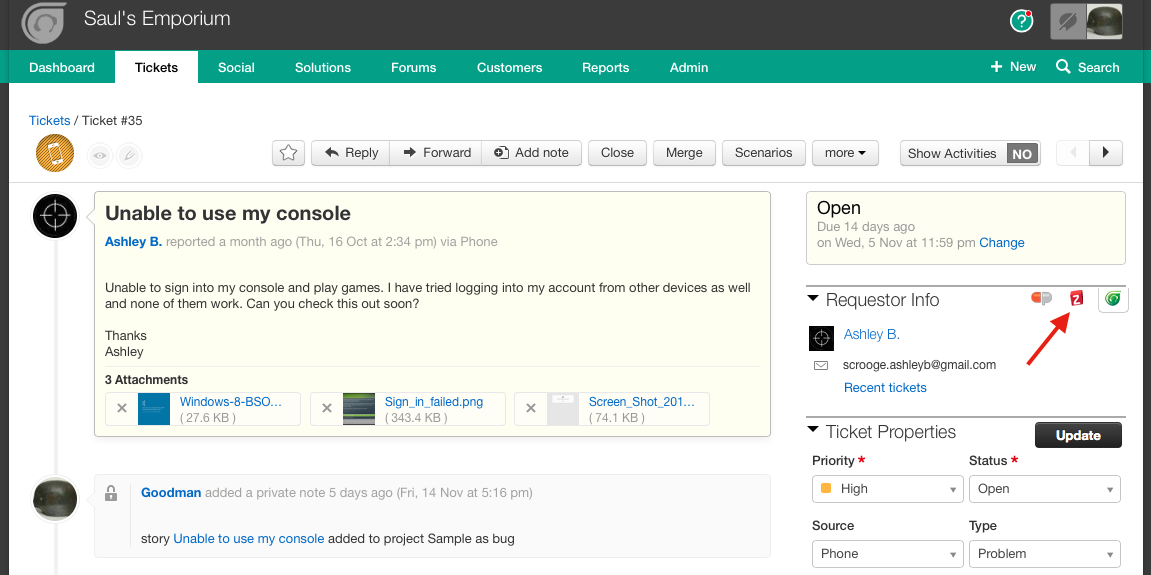
Please note that to display information about requester, they should be a contact in Freshdesk and Zoho CRM. Only if the contact is also present in Zoho CRM, the details would be fetched and displayed inside the ticket in Freshdesk. You cannot import contacts from Zoho CRM using this integration.
Was this article helpful?
That’s Great!
Thank you for your feedback
Sorry! We couldn't be helpful
Thank you for your feedback
Feedback sent
We appreciate your effort and will try to fix the article