Possible Questions:
- I am unable to see the option to export tickets from the list view. How can we fix this?
- I have the default agent role but I don't see the option to export tickets. Why?
Resolution Path:
I am unable to see the option to export tickets from the list view. How can we fix this?
If an agent is unable to see the Export option in the list view, we can suggest them check if they have permission for it. We can suggest the customer navigate to Admin>Agents and click on their agent profile to see the role mapped to them. After that, they can navigate to Admin>Roles and click on the role name.
If the option to export tickets is disabled, then that's the reason why the agent is unable to see the button. Screenshot for reference:
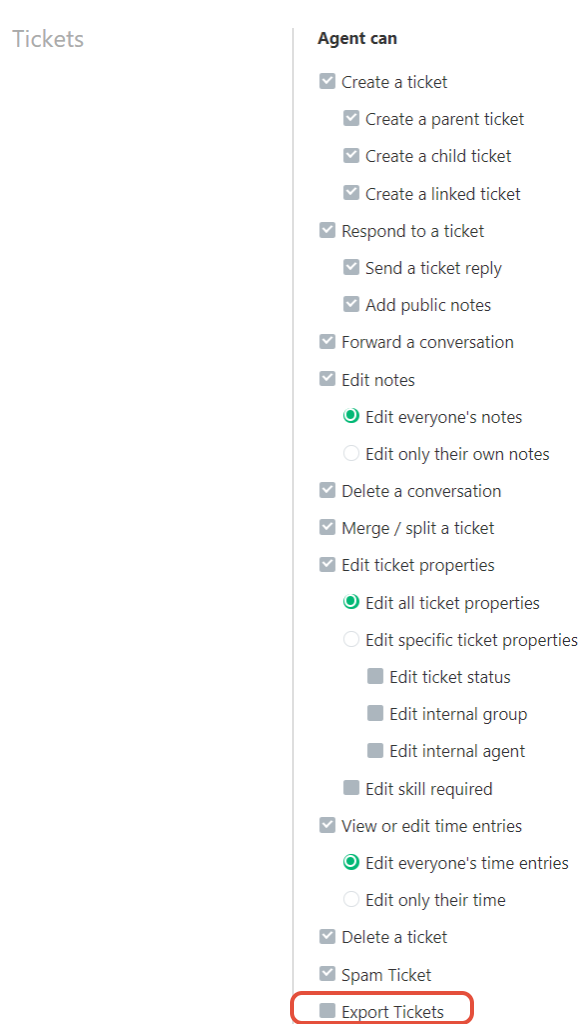
The customer can either create a custom role where they can give the privilege to export tickets and map the agent to that role or grant them any other default role where this access is available.
If an agent has both admin and custom role which does not have the access to export tickets then they would be able to see the Export option as Admin role has the ability to export tickets.
I have the default agent role but I don't see the option to export tickets. Why?
There's a Freshreleaser tracker for this - https://freshworks.freshrelease.com/ws/FD/tasks/FD-100117
We can raise an L2 ticket so that we can execute a script from the backend t the agents can see the option.
Was this article helpful?
That’s Great!
Thank you for your feedback
Sorry! We couldn't be helpful
Thank you for your feedback
Feedback sent
We appreciate your effort and will try to fix the article